
Optimize ESP's Delivery Service
Design A Delivery Management Platform for Espoirer Drivers
Background
Espoirer (ESP) was a traditional logistics company 📦 based in Japan that had expanded to the United States and was facing challenges with its delivery performance. Therefore, they wanted to create a mobile application 📱 for drivers in both the United States and Japan to streamline the “Warehouse to Door" process 🚪, managing deliveries more organized, accurately, and efficiently.
Team
1 Product manager, A team of engineers and 4 UX designers
Timeline
June - Aug 2023
Deliverables
Research Insights in User Interviews, & Competitive Analysis, User Flows, Wireframes, A/B Testing, and Interactive Hi-fi prototypes.
Contribution
I was part of the design team to make ESP’s mobile app from 0 to 1. I led the UX work and collaborated with cross-functional teams, producing all major deliverables and presenting these to the client in weekly meetings. Our team contributed to the design of package list view & map view, scan, and delivery features.
👉 What’s the Problem?
Express delivery services are very inflexible and time-consuming due to traffic congestion and complex buildings and recipients in urban areas. Our client, ESP who was still relying on traditional parcel delivery methods (used barcode scanners to track and confirm the delivery of packages) was facing challenges with managing a growing volume of parcels and dealing with their delivery performance.
🥲 The delivery rate of ESP is 92%, which is lower than the industry standard delivery rate, of 95%
How Might We help drivers manage deliveries and complete orders more accurately and efficiently?
Solutions Overview
Solutions Overview
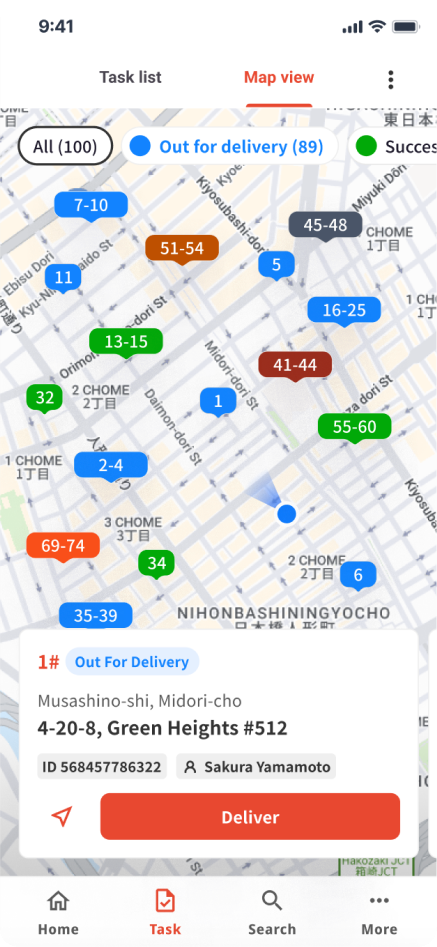
# Parcel List & Map View
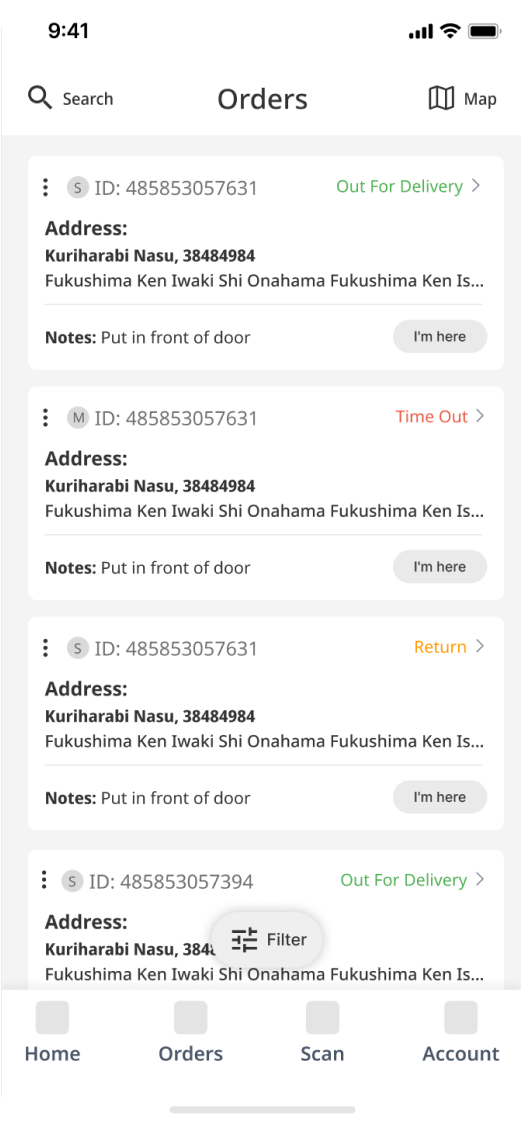
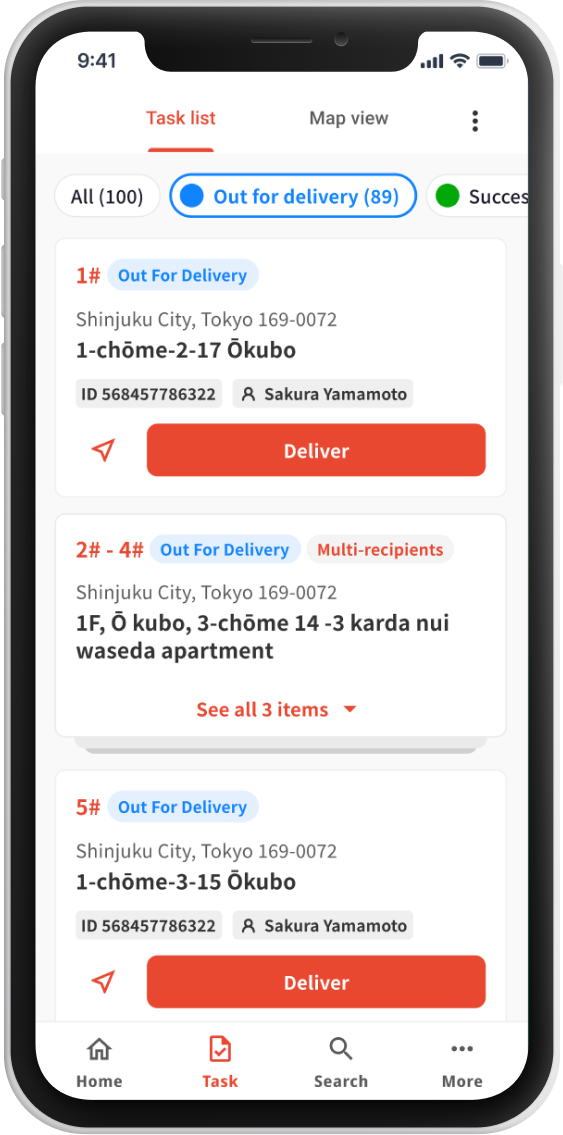
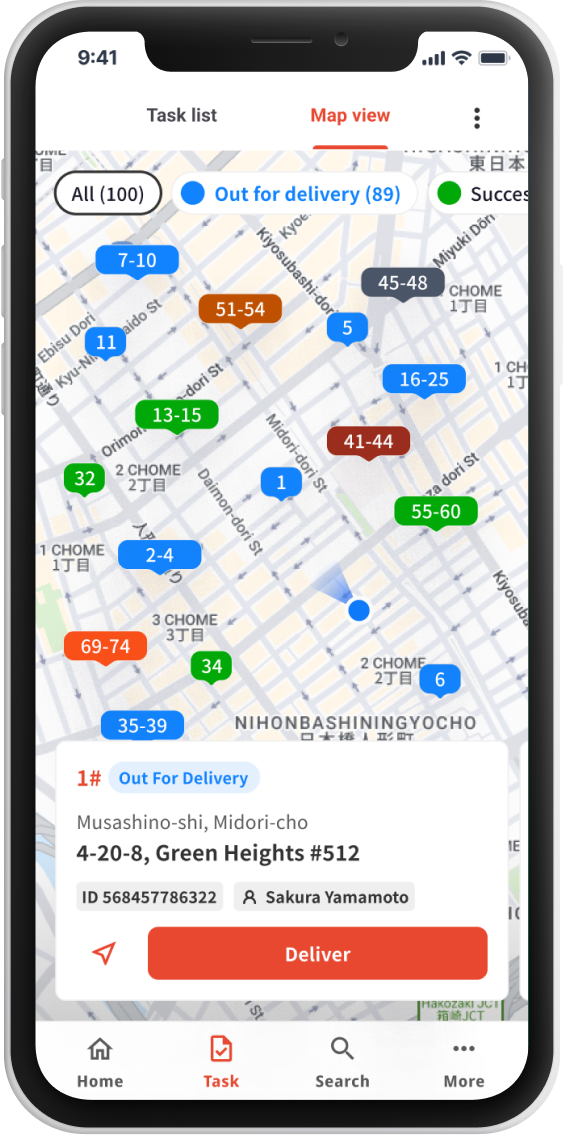
A clear and organized parcel list-view and map-view for drivers to classify parcels and navigate efficiently
- Prioritize essential information such as delivery status, delivery address, and item details.
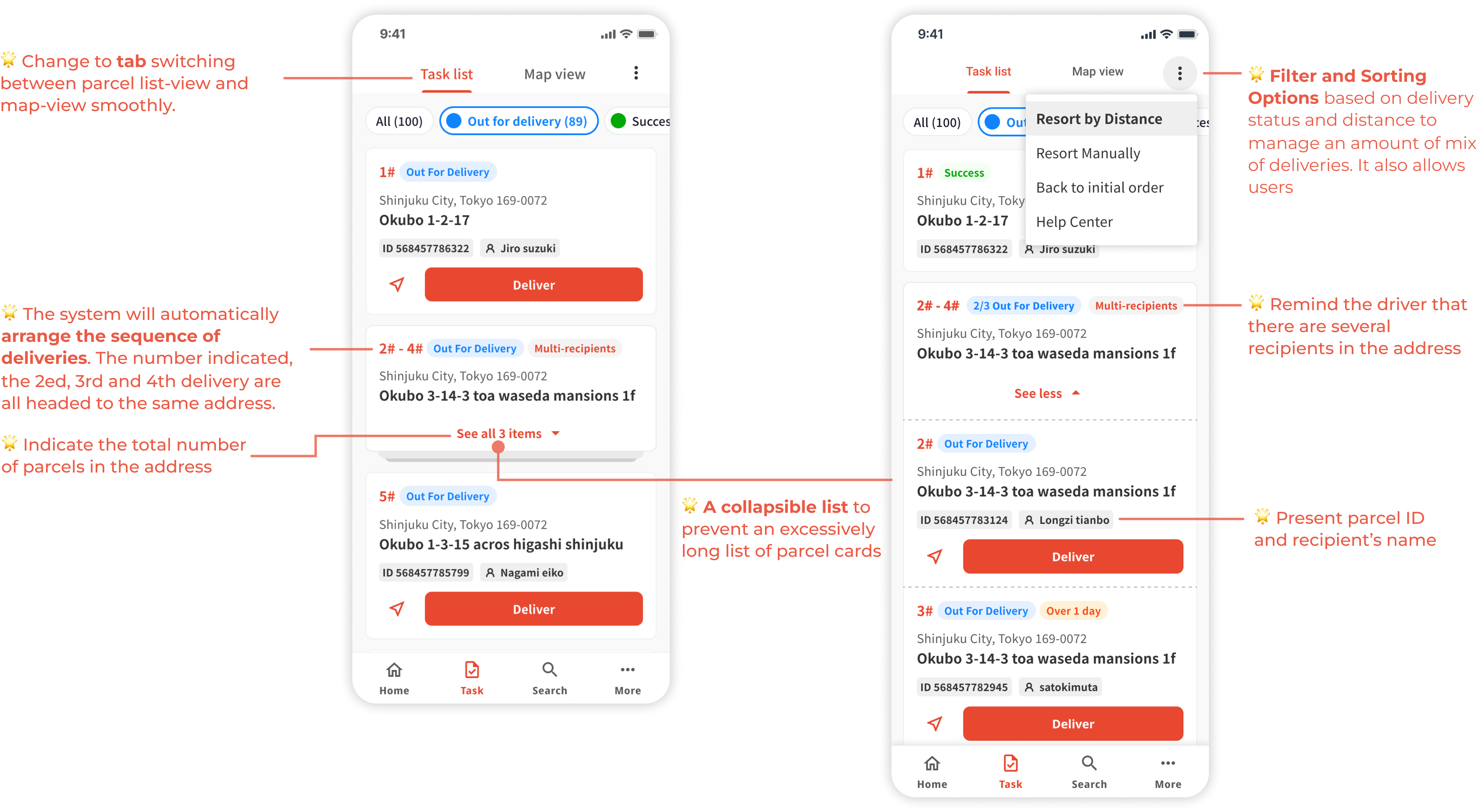
- Filter and sorting options based on delivery status, delivery date, or other relevant criteria, to manage an amount of mix of deliveries
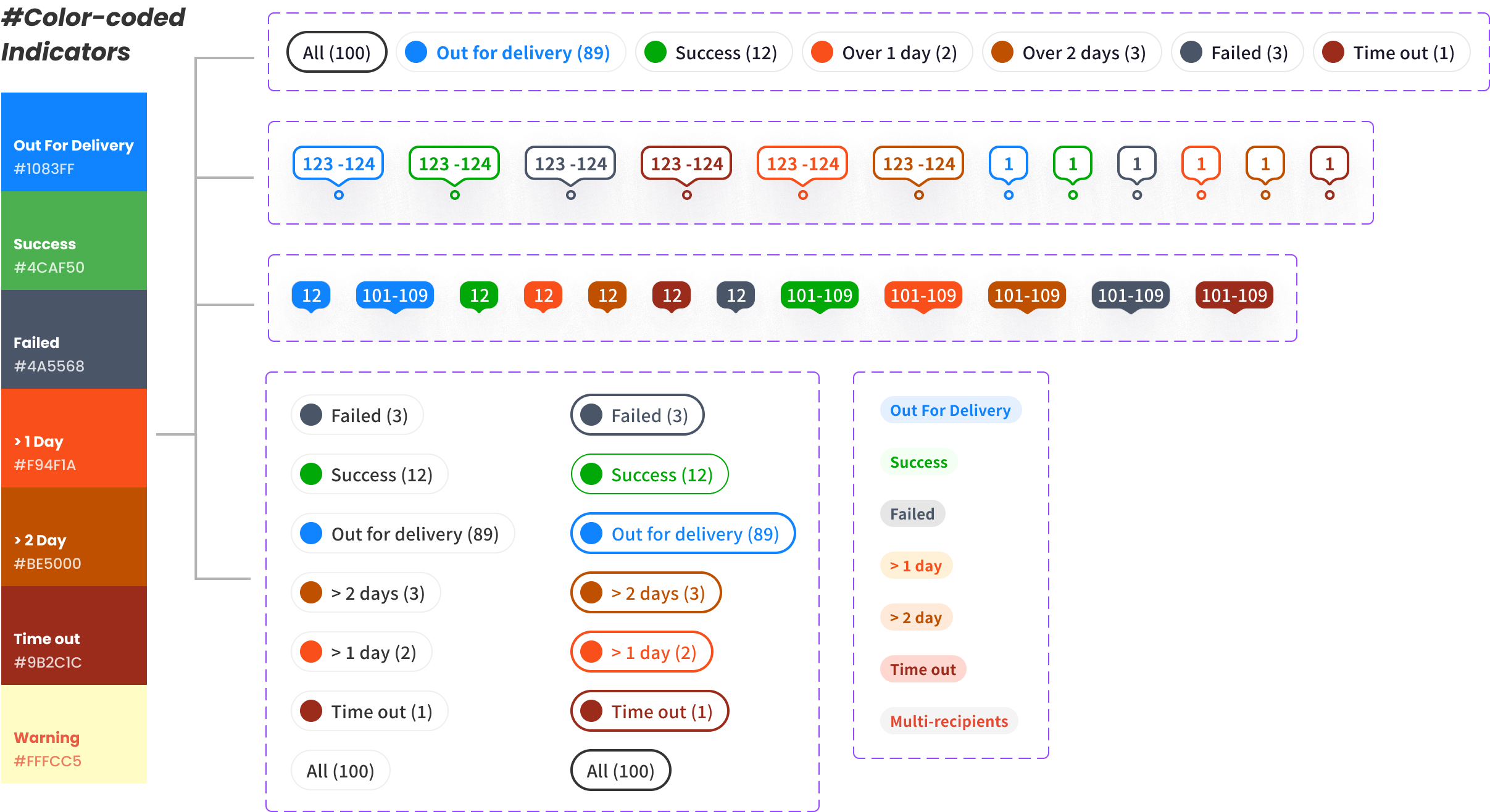
- Implement color-coded indicators for different delivery statuses
- Provide an interactive map and include markers for delivery points and waypoints
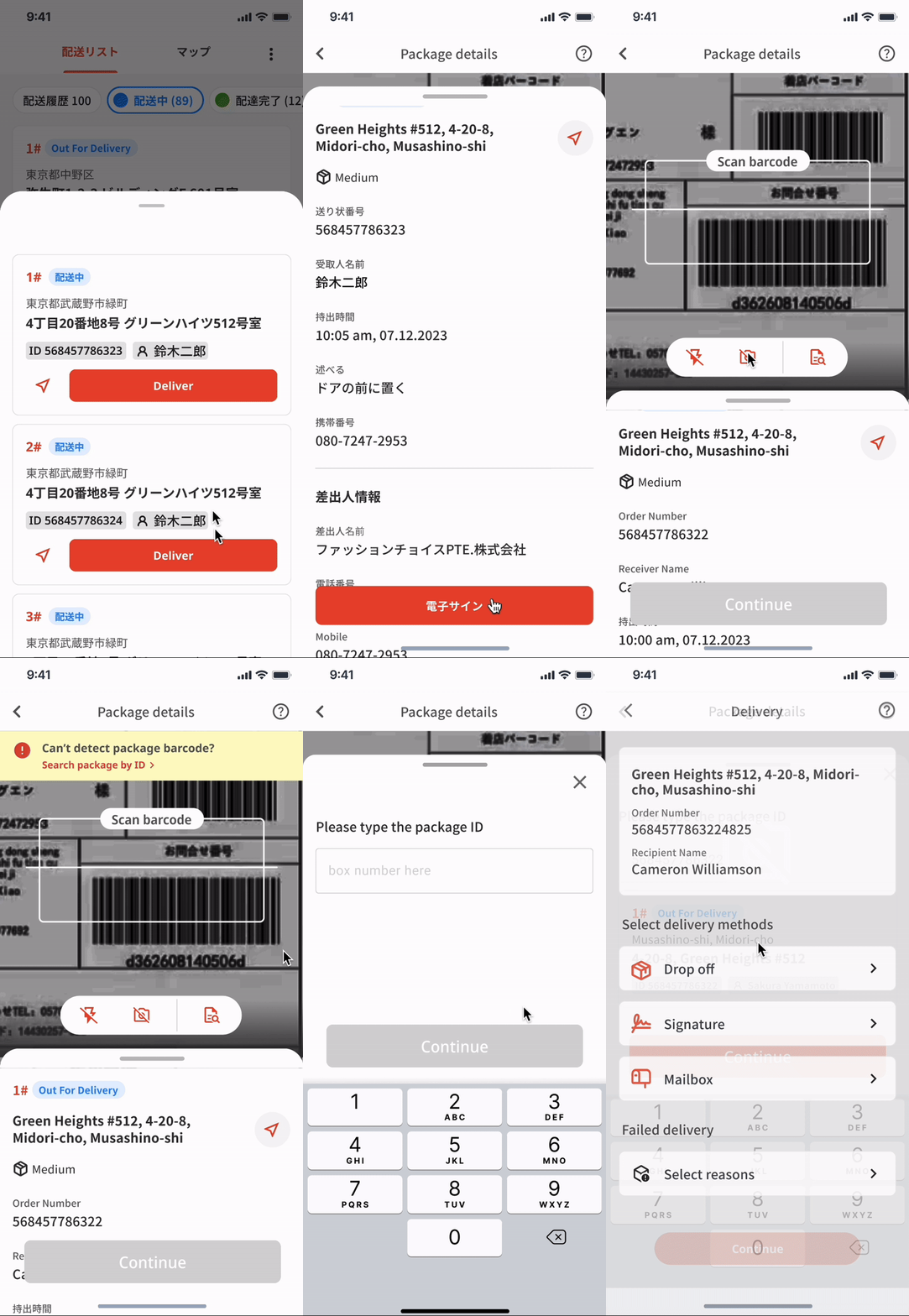
# Scan Pages
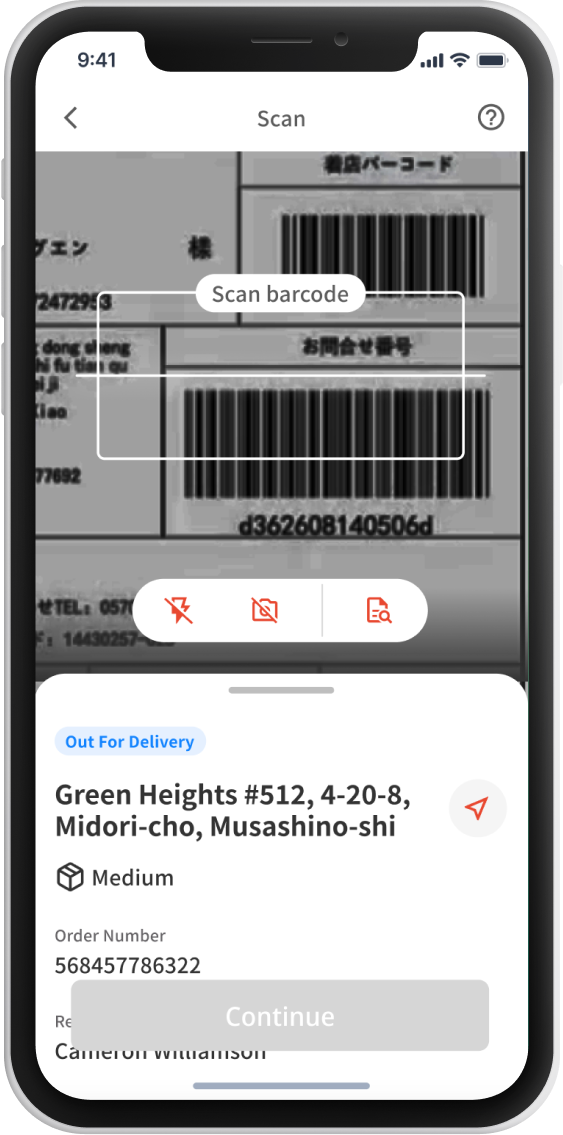
A streamlined and accessible scanning process for drivers to confirm parcel details
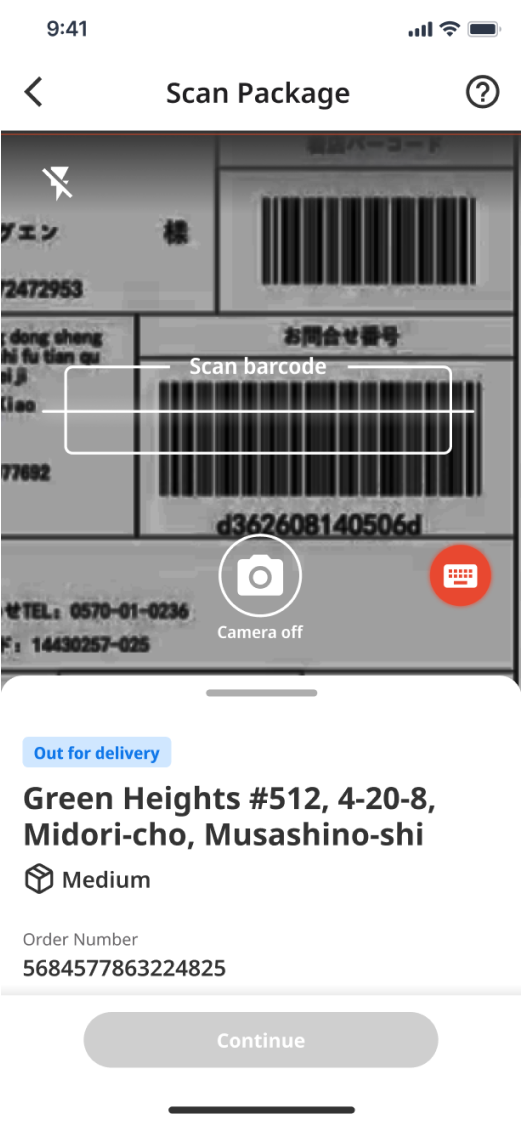
- Enables quickly switch between scanning and parcel details to streamline the scanning process
- Prioritize essential package information based on user's habits, such as recipient details, delivery address, and item summary
- Include troubleshooting tips and suggestions for accidental situations
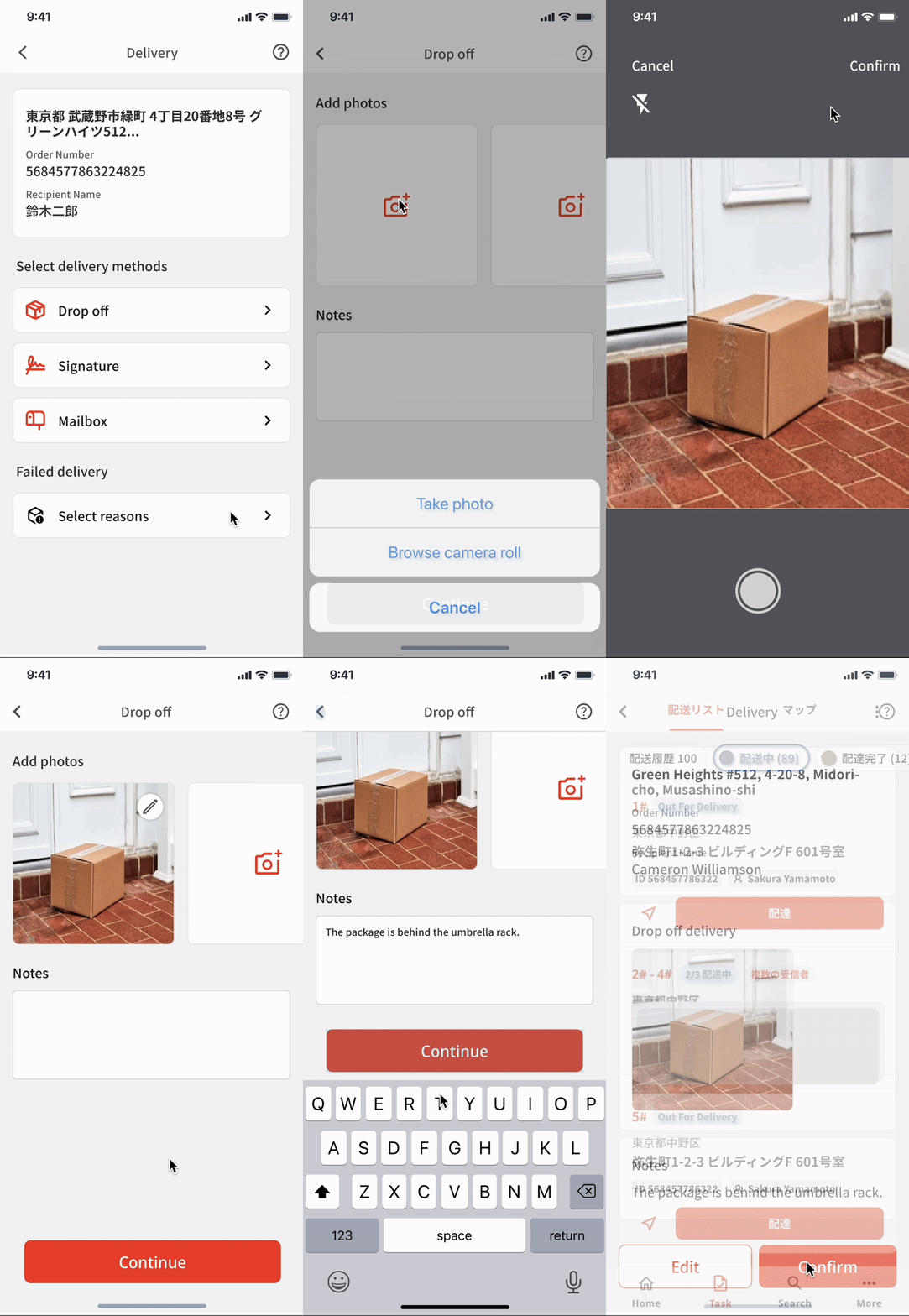
# Delivery Pages
A thoughtful and efficient delivery process for drivers to connect with customers
- Offer both contactless and traditional delivery options, allowing customers to choose delivery drop-off locations.
- Implement photo confirmation for proof of delivery
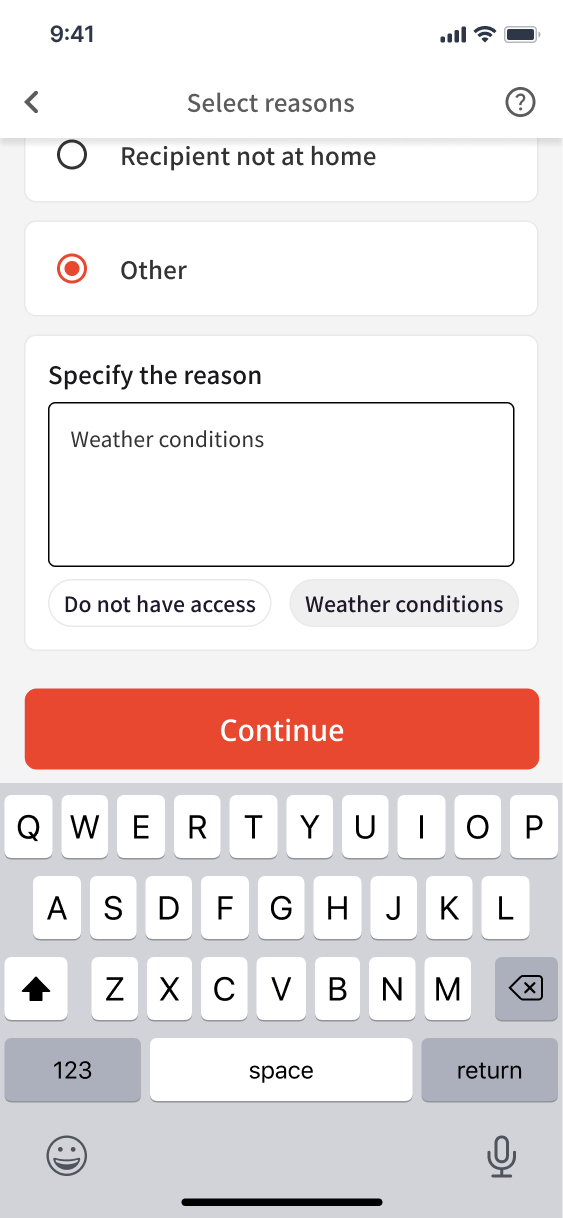
- Provide entry for failed delivery situation to address the issue and ensure customer satisfaction
How we get there
Design Process

Research
The project's primary purpose is to create a mobile app for ESP drivers who work in the United States, and if possible, they also want to apply it to their Japanese Market. They hope the app to help them streamline the “Warehouse to Door" process, managing deliveries more organized, accurately, and efficiently.
At the beginning of the project, I had absolutely no knowledge 🤯 about the drivers' delivery process, so I started the project with various questions💭.

To understand the questions above, I started with interviewing Internal stakeholders 🎙️ with my teammates to better understand drivers’ current workflow 🏍️ and the pain points 🥲 involved.
What are the user needs and goals?
Persona & User Journey map
We conducted 6 talks 🎙️ with internal stakeholders and drivers who worked in the United States to better understand the existing delivery process. These conversations aimed to uncover their workflow, goals and frustrations related to the existing traditional delivery process.
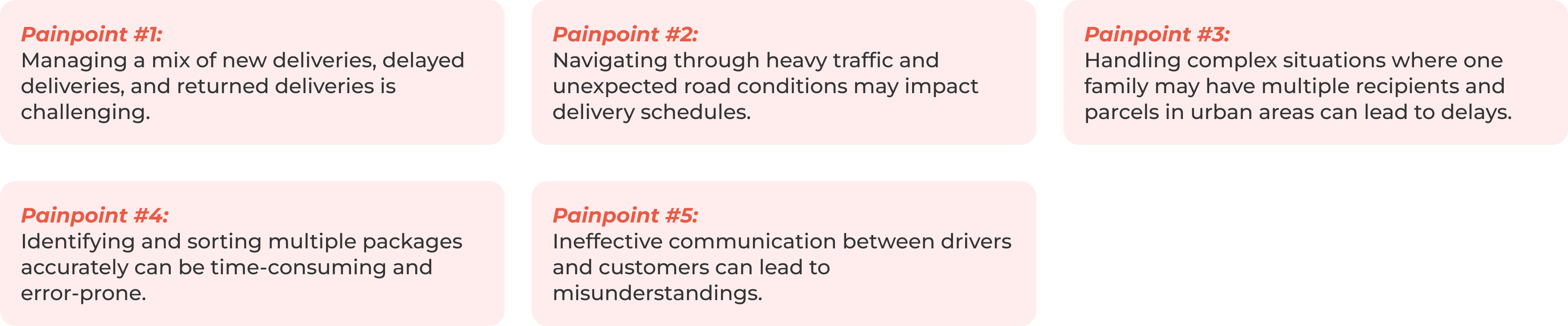
Based on that, we did a persona 💁, mapped out the user journey, and pinpointed steps where users might encounter difficulties or frustrations. After confirming with the clients, we conclude them into four primary pain points with corresponding solutions.

After confirming with the clients, we conclude them into 5 primary pain points with corresponding solutions.
What have worked well in the market?
Competitive Analysis to Consider Design Opportunities
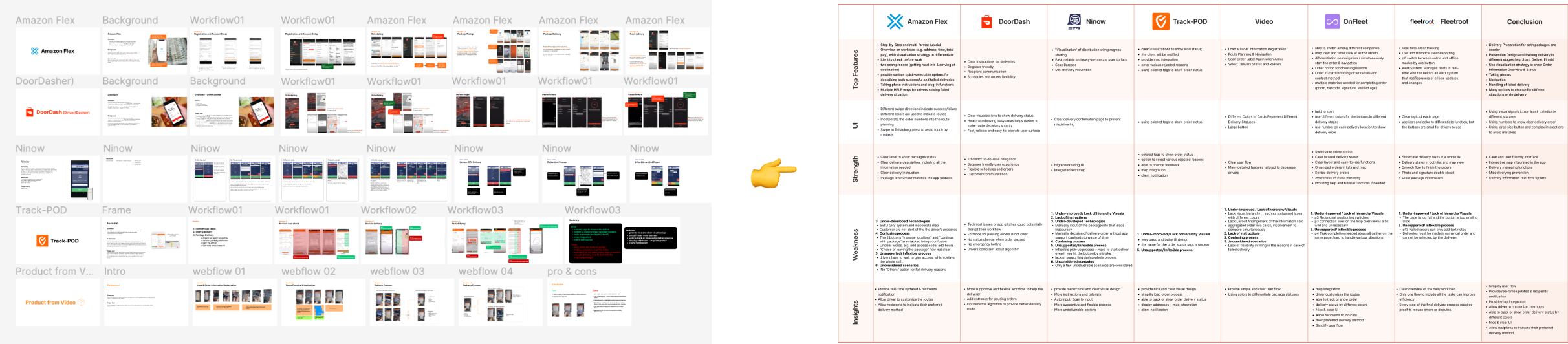
We conducted a competitive analysis on 7 direct competitors from both the American Market and Japanese Market to gain insights into how other companies are addressing similar challenges in the delivery industry. We examined usage videos in YouTube channels and captured screenshots of interfaces to analyze their top features with corresponding strengths and weaknesses.
Design Strategy
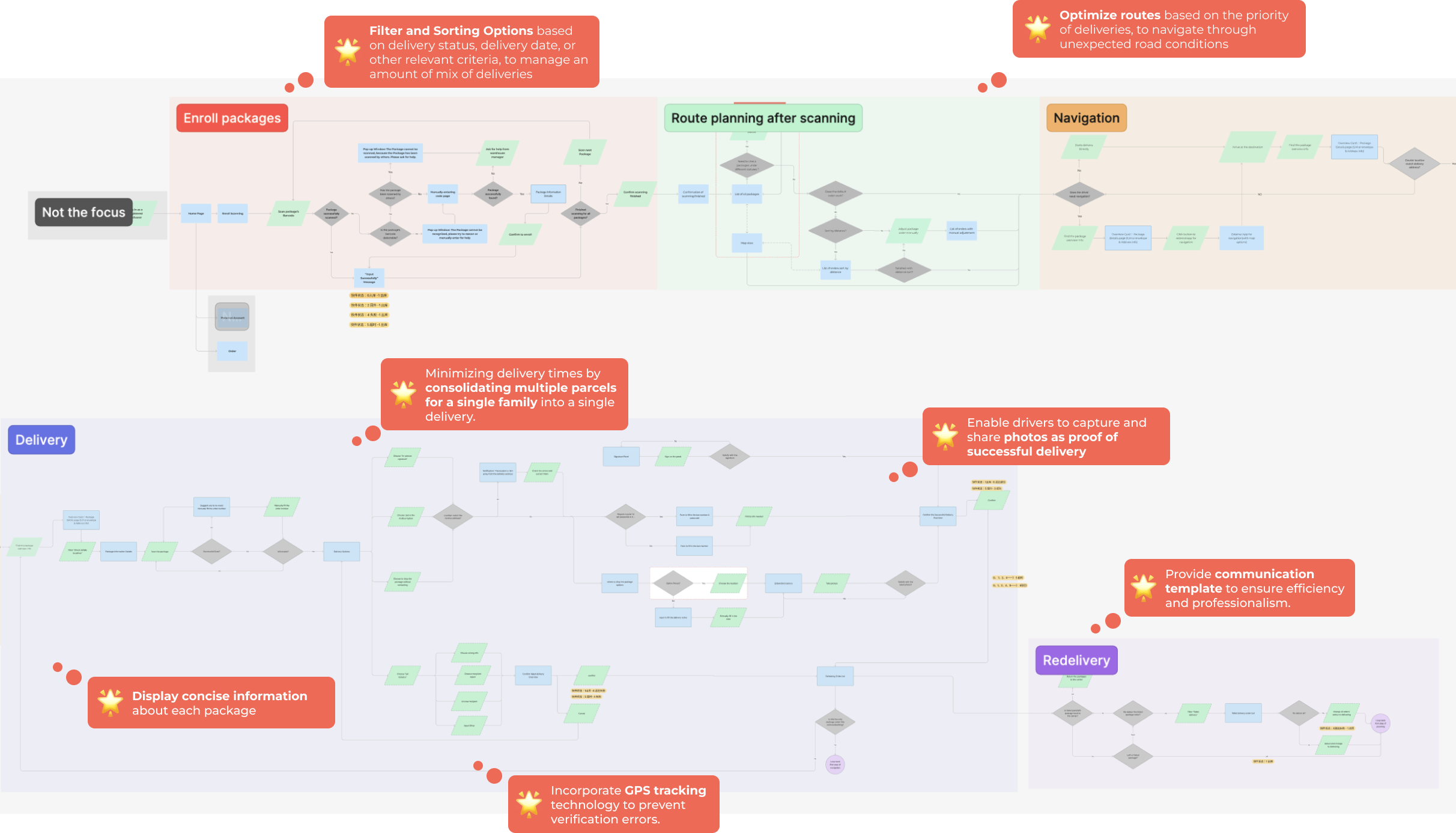
Based on our comprehensive research, we formulated targeted design solutions to address each identified pain point in the delivery process. We created user flows in the first step📍. These user flows serve as a basis for discussions with Product Managers 🧑💼 and Engineers 🧑💻 to ensure alignment with operational requirements and to identify and address any potential technical limitations.
How might we optimize the delivery process?
User Flow
🌟 Ideate
Even though we've carefully devised design strategies to address pain points at each stage, executing them in the prototypes poses a significant challenge 🥲.
I took the responsibility to design the Parcel-List Pages 📦 & Scanning Pages 📸. Transitioning from wireframes to high-fidelity mockups, I offered multiple solutions for primary interfaces to facilitate A/B testing 📊. The final designs were refined through feedback from both Product Managers (PMs) and potential users👬, with the overarching goal of crafting seamless and user-friendly experiences.
Additionally, because most of ESP's customers in the United States were from Japan, we designed the initial English version of the app with the Japanese name written in English.
Design Challenge #1
How might I optimize the delivery process by minimizing delivery times?
I initially listed parcels individually to present the maximum details for each package. After discussing with PMs, I learned that ESP always provides services for areas with high delivery density, where clustering by location. Therefore, I decided to minimize delivery times by consolidating multiple parcels for a single family into a single delivery.
🎨 I designed three options to choose from 🎨
Option 1:
Solo Parcel View
Each parcel is listed individually to ensure maximum details are presented to drivers.
Option 2:
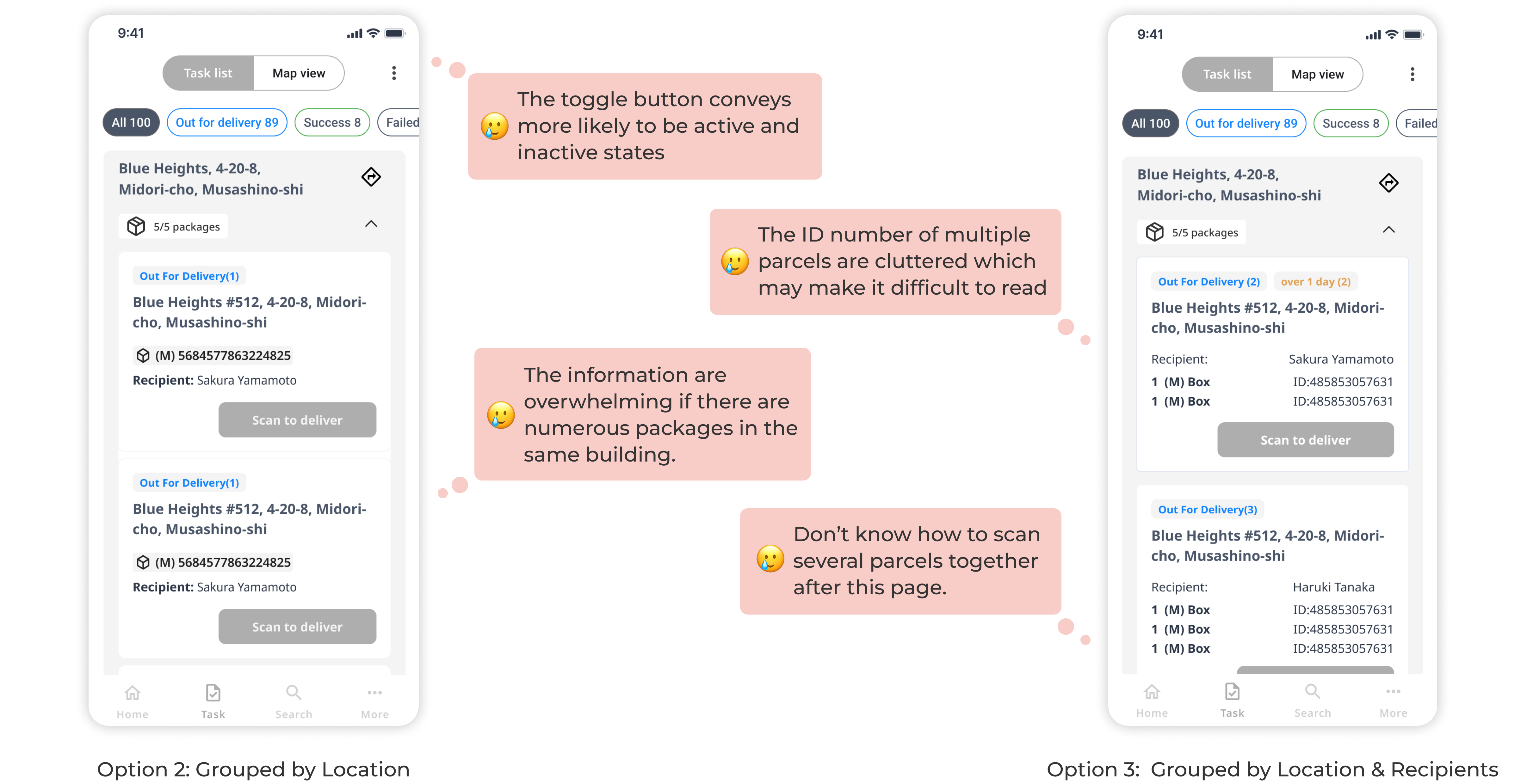
Grouped by Location
Parcels in the same address are grouped to optimize delivery routes.
Option 3:
Grouped by Location & Recipients
Optimize routes further by bundling parcels to the same address and recipient.
📊 A/B Testing📊
Following discussions with the PM from clients regarding various options, the PM also agrees that option 2 & 3 appear to be the optimal design choices, which could arrange parcel information in more structured ways to optimize delivery routes and prevent unnecessary repetitive deliveries, but we are unsure which one would work better for drivers. Therefore, I proposed conducting A/B testing to gather user feedback and determine the preferred design choice based on the drivers' experiences.
The A/B testing was conducted with 4 drivers from ESP. I predefined the scenario from arranging the parcel list to scanning, including using filtering options, reading parcel information, and scanning parcels' barcodes. I gathered valuable feedback on user's preferences and challenges with each design variation.
🌟 Final Delivery 🌟
The design of option 2 made more sense compared to option 3 in the A/B Testing, so we decided to implement option 2 for now. Additionally, based on users’ feedback that numerous parcel cards will still be overwhelming, we iterated the design as a collapsible list to prevent an excessively long list of parcel cards.
Design Challenge #2
How might I design an accessible & streamlined scanning process including a various functions?
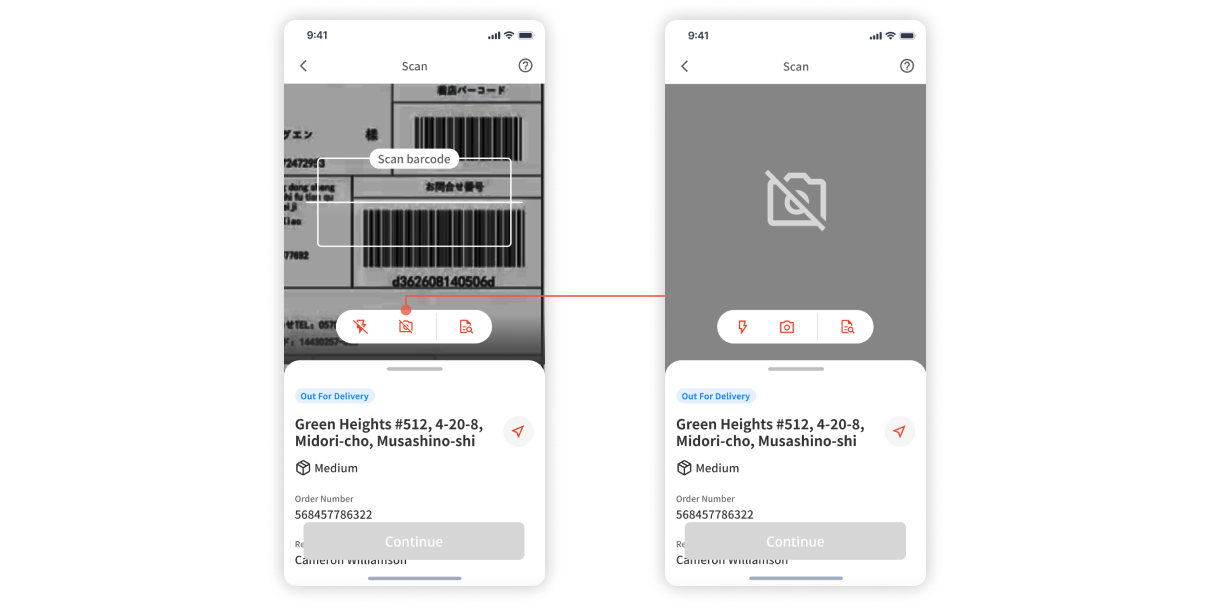
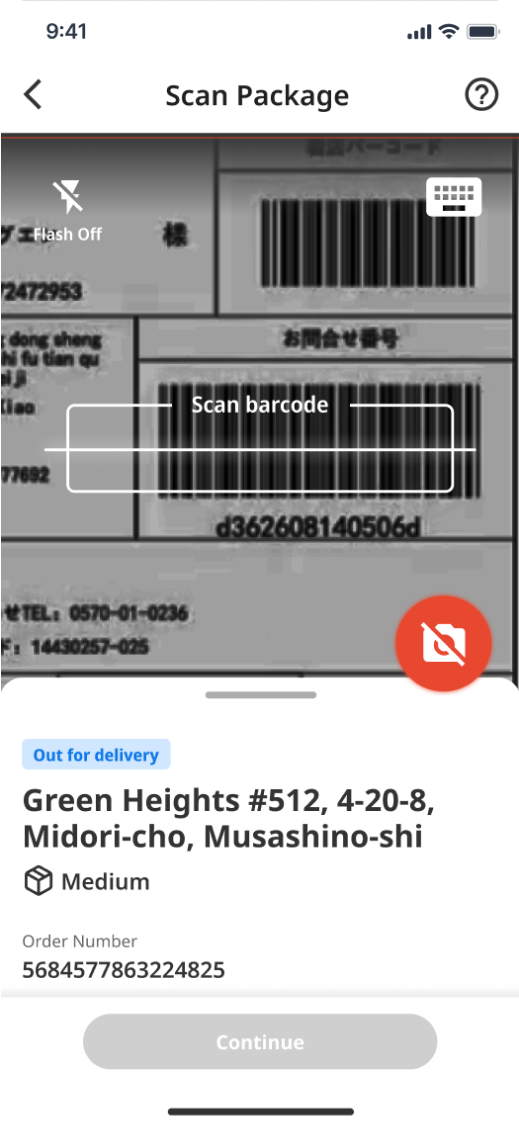
Initially, the requirement was only for a scan function to enable drivers to record delivery status. However, the technical team proposed an immediate enhancement to enrich the scanning process. This enhancement involves adding the ability to turn the camera on/off for power conservation 🔋. Furthermore, considering edges cases, our designers proposed introducing a search function to handle cases where the parcel ID cannot be recognized 🔎, and incorporate the option to toggle the flash on/off for dark environments 📸.
😐 Conflict with PMs
I initially structured and prioritized the three functions because PMs emphasized the importance of the camera on/off function over the flash and search functions. However, after discussion, I found the reason behind this prioritization is the technical team's consideration of the importance of saving power for drivers during the delivery process.
👇
Solution
📊 Iterated to Improve Accessibility based on A/B Testing📊
Because the Drivers felt the three functions share equal priority, I iterated by arranging them as a group thinking about the principle of proximity. After discussing with the PMs, buttons are strategically positioned close to the user's fingers on the phone screen. This allows drivers holding multiple parcels to conveniently access the buttons with a single hand, considering usability and ease of interaction.
👇
😑 There is Another Problem... 😑
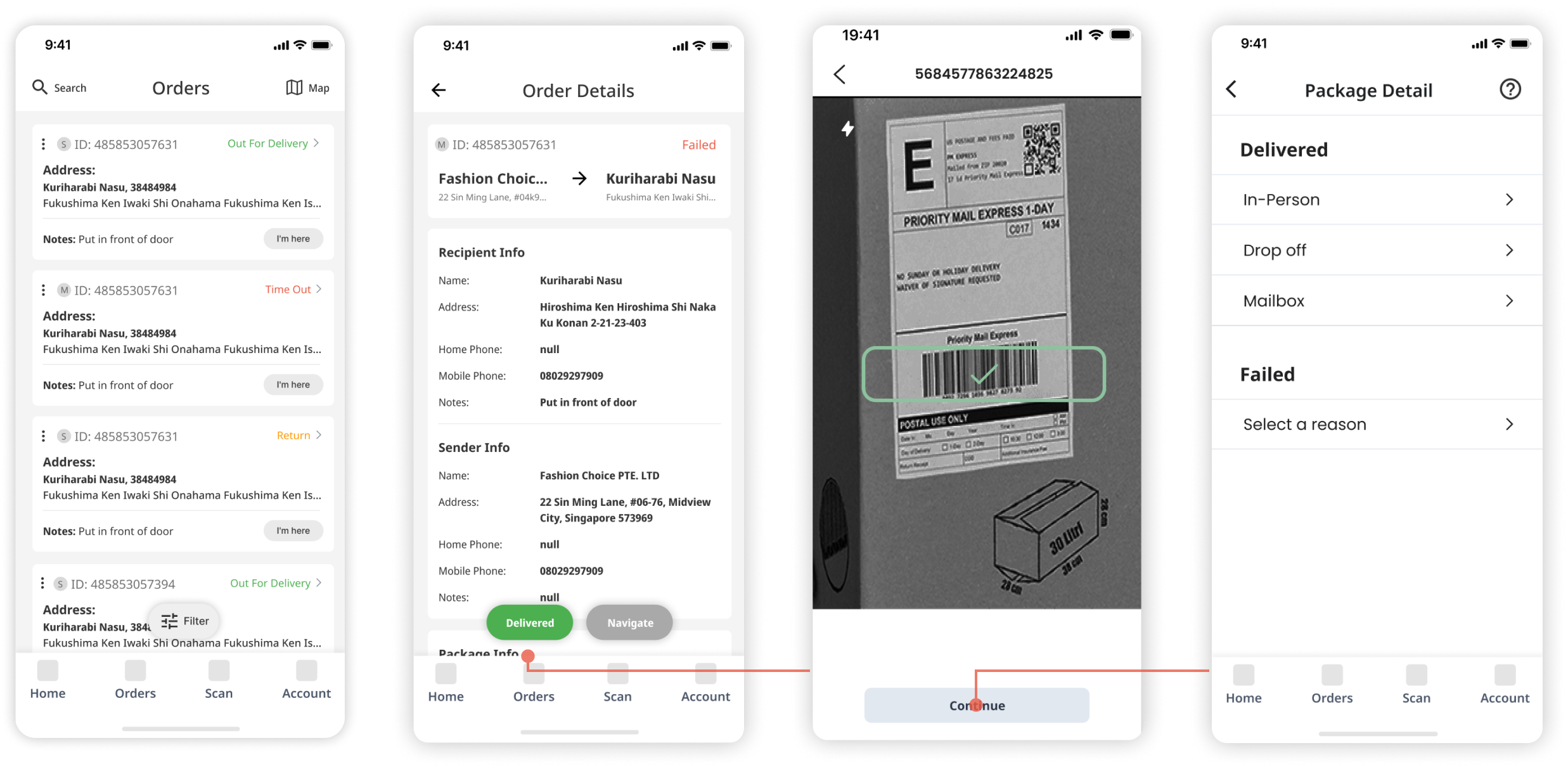
The initial user flow would lead drivers to the “Order Detail Page” to check the detailed parcel information before arriving at a location. They then clicked the “Delivered” button to scan the package ID. However, this user flow might introduce complexity, especially if drivers find it challenging to return to check the order details when scanning.

👇
Solution
🌟 Simplified the Workflow 🌟
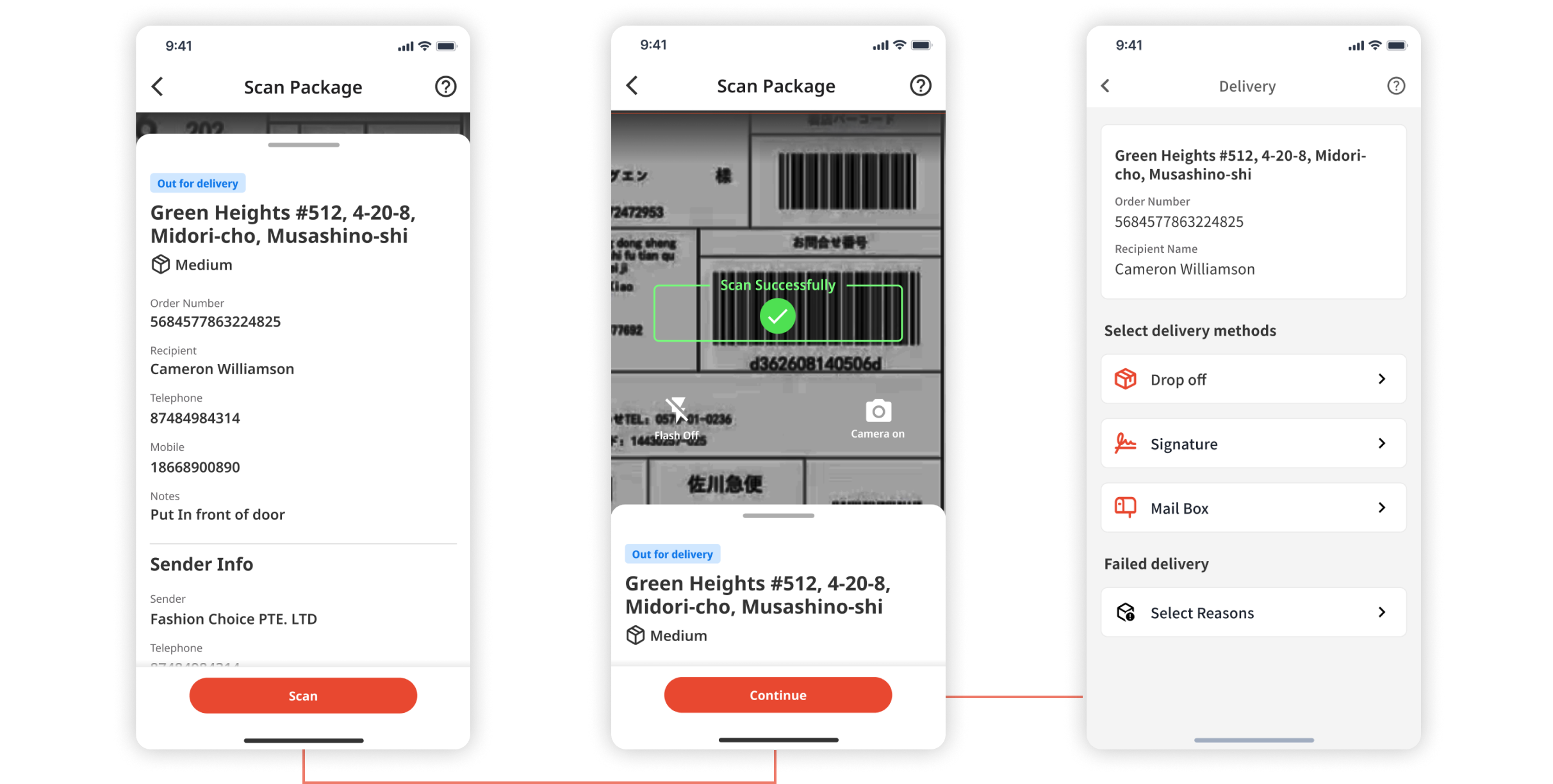
To make it easier for drivers to check order details during scanning, I transformed the “Order Detail Page” into a draggable bottom window integrated within the scan page. After obtaining confirmation from both Product Managers and Engineers regarding its feasibility, the integration lets users quickly switch between scanning and parcel details, streamlining the scanning process and improving delivery efficiency.
Considering...
🌟 Edge Cases 🌟
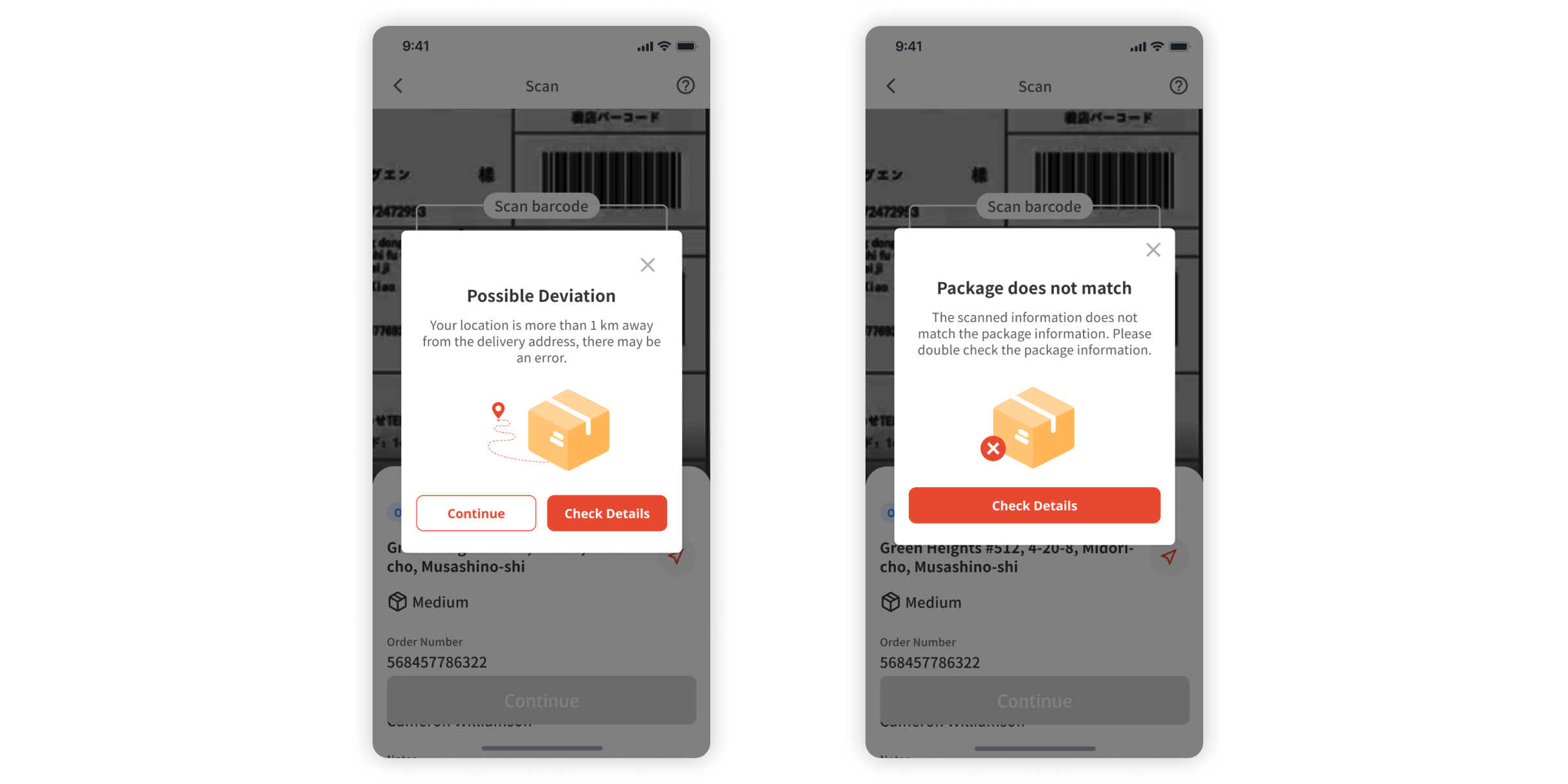
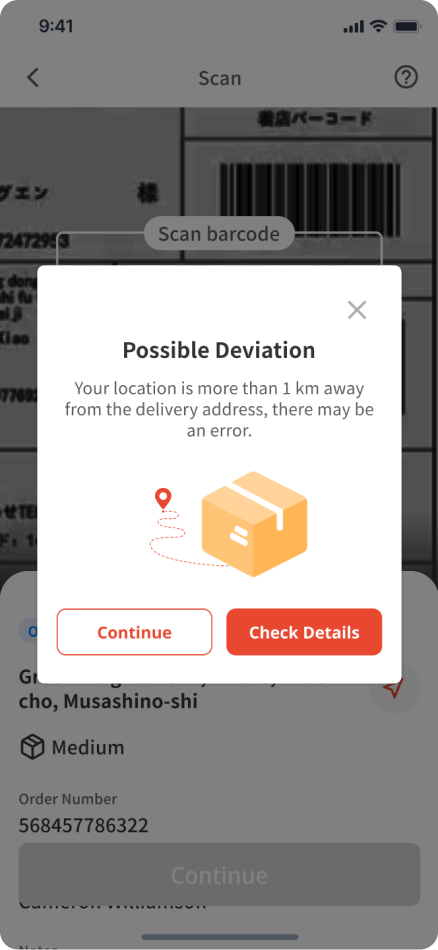
I took into account scenarios where the driver's actual location is over 1 km away from the delivery address and the information on the packages does not match. After consultations with the technical team, I created a pop-up window to prevent potential errors.
Design Challenge #3
How might we adapt our app for the Japanese Market that meet local preferences?
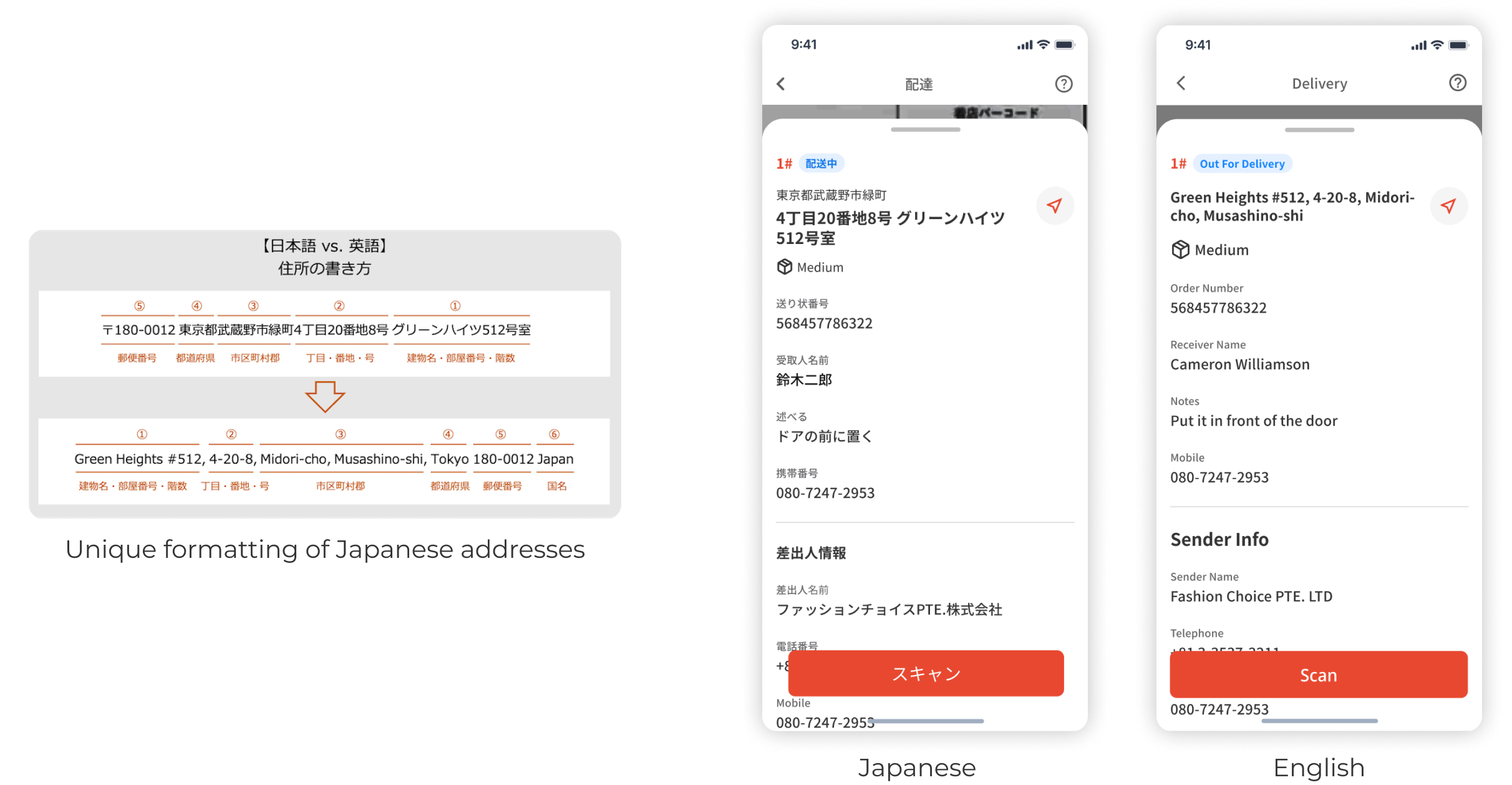
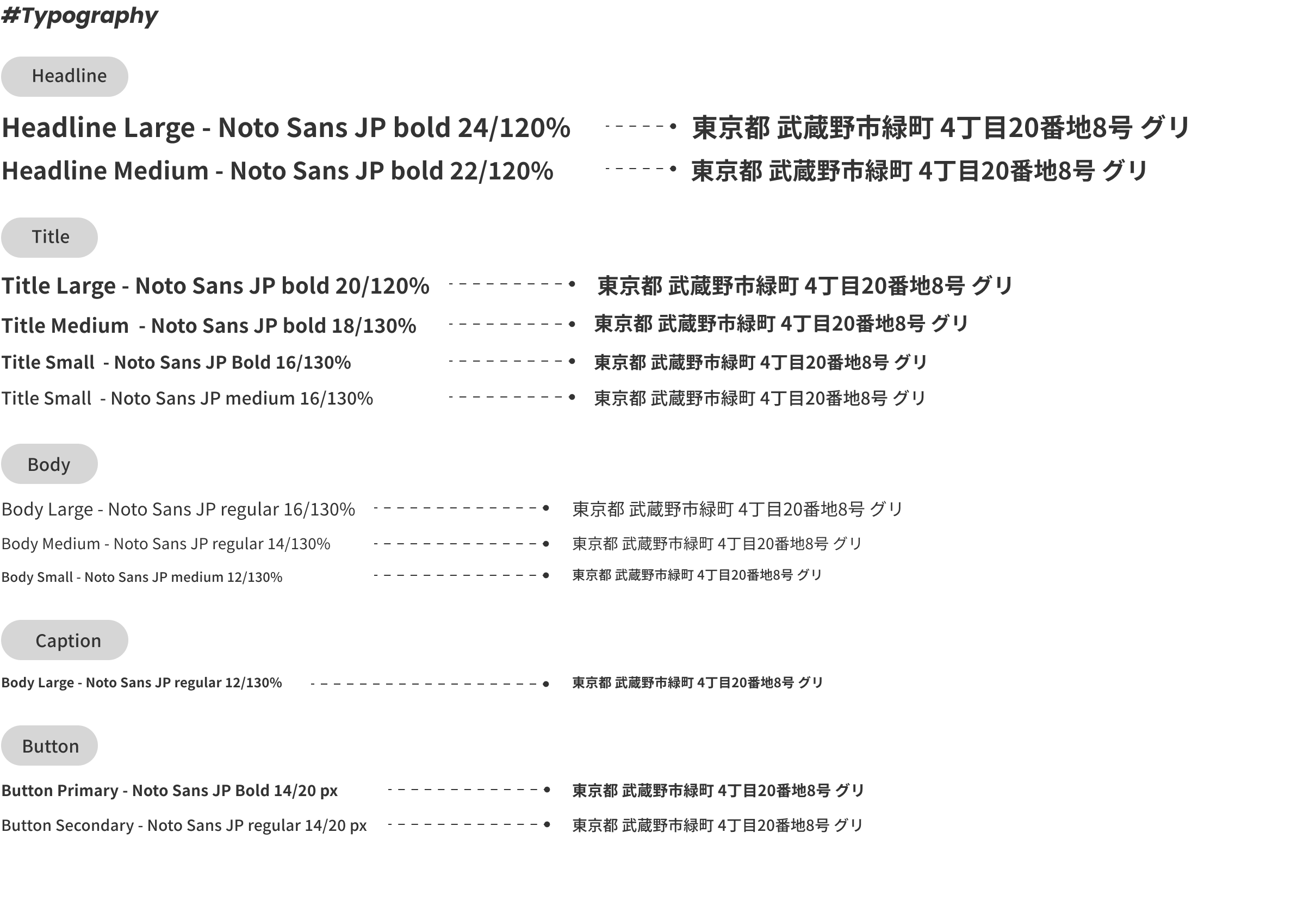
While the app is primarily designed for the American market, the clients express a desire to apply it in Japan. Recognizing the unique formatting of Japanese addresses, which differs from English addresses, we chose fonts that are compatible with both Japanese and English to accommodate this cross-cultural use.
Design Challenge #2
Be Compatible with both iOS and Android
As PMs mentioned most of drivers utilized Android and large screens like iPhones. We design responsive layouts that adapt to large and small screens to ensure that the app looks and functions well on various devices. We also tested the key screens on both iOS and Android devices to identify and address inconsistencies in components.

In addition to numerous testings and iterations 🔁 on functionalities, interactive elements, and written content... Color-coded indicators and play a significant role in conveying messages✨ , as well as selecting typography for cross-cultural use.
Impact
1) after the second phase, when the other group of UX designers worked on the left part in August, the app was launched. According to the clients' calculations, the delivery rate of ESP went up from 92% to 95% 🆙, which matches the industry standard delivery rate.
2) The feedback from clients and users was really positive😊, indicating that they feel the final design could better help them with delivery performance.
Some Takeaways
1) Design with Methodologies
👶 As a novice in designing delivery services, I initially faced uncertainty about how to proceed. However, I employed diverse approaches, including competitive research to identify design opportunities, collaborating with the PM for potential tactics, and utilizing A/B Testing to understand users’ needs. These experiences have equipped me with valuable tools and insights to tackle similar challenges in the future.
2) Leverage research insights for informed design decisions
🧐 The initial research & user testing played a crucial role in shaping our design choices. By analyzing user feedback and conducting usability tests, we gained valuable insights into user preferences and pain points. This data-driven approach enabled us to make informed decisions that improved the user experience. Moving forward, we will continue to prioritize data analysis and employ A/B testing to refine our designs, ensuring that our products align with user needs and expectations.
3) Some more improvement...
😐 We emphasized the affordance of a new product is crucial, especially since some users didn't have a lot of experience with using the mobile app for deliveries. Due to the time constraints, the clients decided to create tutorial videos for their drivers, which were inspired by a similar approach used by a competitor, Amazon Flex. If we had the chance, we would combine extra guidance for new users on complex features, like manually sorting parcels or searching for parcels by ID.
👀 Discover More of My Work





 Enhancing Adoption Rate and Efficiency of the Bug Notification Center
 Ensuring Smooth and Enjoyable Interactions with Robots
 Enhancing Brand Consistency & Accessibility For Aetna’s Website